An ESP32-S3 board costing around $10 could bring online play, cloud saves, and RetroAchievements to a Super Nintendo, provided the user has an sd2snes or FXPAK PRO cartridge. The accessory is called sd2snes+ Link and connects to the cartridge’s USB port; its companion firmware, sd2snes+ 3.0, is still in testing.
The proposal comes from the sd2snes+ project, which describes Link as a small intermediary between the cartridge and the network. The device acts as a USB host, replacing the computer normally connected to the cartridge and providing access to services while playing, without opening the console or soldering internal wires.
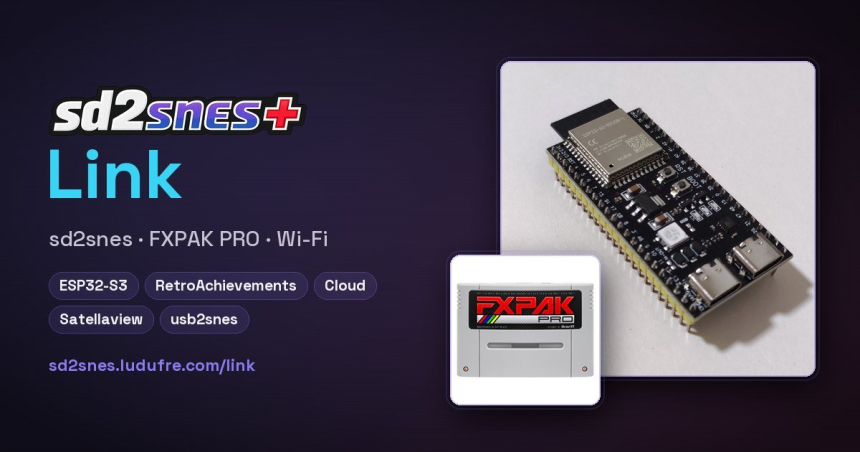
An ESP32-S3 board with two USB connections
The firmware is designed for an ESP32-S3 N16R8 in DevKitC-1 format. The recommended variant offers 16 MB of flash memory and 8 MB of octal PSRAM. LockerGnome estimates that these boards usually cost around $10 at stores such as Amazon; this is not an announced retail price for a finished product, but the approximate cost of a generic board.
The two USB-C connectors serve different purposes. UART/COM receives power from a 5 V USB charger, with a minimum of 0.5 A and 1 A recommended; the USB/OTG connector links to the sd2snes or FXPAK PRO and must supply 5 V to the cartridge. Without that power, the cartridge will not detect Link.
The firmware is initially installed from a computer connected to the COM port, using a compatible browser: Chrome, Edge, or Opera. After that, updates can be downloaded and installed from the console menu without removing the SD card. Once Link is connected, the PC can no longer use the cartridge’s USB port at the same time; the project proposes accessing Web Manager over the local network.
Using the accessory’s features also requires sd2snes+ 3.0 or later on the SD card. The project explains that Link and cartridge firmware work together: the former is updated from the menu, while the latter provides the necessary screens. The official site describes a preview version and warns that firmware 3.0 is still in testing.
Cloud backups and achievements on your TV
Automatic backups cover save files, savestates, cheats, patches, and the config.yml file. Link sends only changes, and the cloud keeps up to three previous versions of each file. They can be viewed, restored, or deleted from Web Manager, and saves can also be deleted from the console’s Saves screen.
The planned quota is 500 MB per account, shared across all linked consoles. The service limits access to 800 users. To link the device, users sign in with a GamesDB account and enter a six-letter code or scan a QR code displayed on the TV; the code expires after 10 minutes. The project page stresses that ROMs are not uploaded to the cloud.
RetroAchievements also works from the console. The user signs in to their account on the TV, with the password hidden, and Link reads the game on every frame to record achievements on the profile. The board’s LED lights up when one is unlocked. The feature is disabled by default and can be enabled in the menu or disabled for specific games.
There are limitations: for now, games without a special chip or with a DSP chip are supported, and achievements are recorded in softcore mode. Hardcore mode is unavailable because sd2snes+ Link is still awaiting approval from RetroAchievements. The project also notes that the optional achievement sound does not play in games with chips such as DSP, SA-1, or Super FX, or in MSU-1 titles.
Satellaview, radio, and a city between consoles
Link brings back part of the Satellaview experience: it downloads broadcasts over Wi-Fi and delivers them to the cartridge as if they were coming from the satellite. It also sets the cartridge’s clock over the network so that programming matches the time. Broadcasts can come from GamesDB, Satellaview+, or files saved on the card itself. This feature requires the user’s BS-X on the card.
The menu can play internet radio. The board receives and decodes the audio, which the cartridge sends to the TV; the screen displays the station, song, and buffer. Up to 16 custom stations can be registered from Link’s local page, which checks each address before saving it. MP3 streams over HTTP or HTTPS are supported, along with a list maintained in GamesDB. The radio stops when a game is launched.
Another feature, called City, assigns each console a house in a shared space that grows based on playtime. Users can visit friends’ houses, view their shelves, leave messages, themes, or games in the mailbox, and see who is online and what they are playing. The city also works offline: the project description credits Link with adding networked neighbors. ROMs are not transferred; games are displayed, not their files.
Online play and Game Boy link cable over the internet
The project offers two ways to play over a network. Link Play lets two people play from their own consoles, each with their own controller and a copy of the same game version. The accessory exchanges controller inputs between the two consoles frame by frame, with a few frames of delay, in an idea inspired by the 1990s XBand modem.
The list of tested games includes 12 SNES titles: Bust-A-Move USA, Donkey Kong Country 3 USA, NBA Jam Tournament Edition USA, QUIVER v1.3, Street Fighter II Turbo USA, Super Bomberman USA, Super Bomberman 2 USA, Super Mario Kart USA, Super Mario World USA, Super Street Fighter II USA, Tetris & Dr. Mario USA, and Top Gear USA. Both players need Link and the same game version; the project says compatibility is expanding as more titles are tested.
It is also possible to emulate the Game Boy link cable over the internet using the cartridge’s Super Game Boy. Tested games are Dr. Mario World (Rev 1), Pokémon Yellow USA and Europe, Tetris World (Rev 1), Tetris Attack USA and Europe (Rev 1), and Tetris DX World. The site considers that other games with link cable support might work, but clarifies that they have not yet been tested. The feature may be better suited to titles that tolerate latency, such as Pokémon trades.
The accessory also adds a usb2snes API on the local network, compatible with the protocol used by QUsb2Snes and SNI. It can provide access to game memory and files on the card, trigger a reset or return to the menu, and load games using the Boot command. It supports up to four simultaneous clients, opening access to community tools without connecting a PC directly to the cartridge.
The firmware is still in testing
Wi-Fi is configured from the TV using the controller: users can search for networks, connect, or forget a connection. An incorrect password is not saved, and the system returns to the previous network. If there is no known network, Link creates its own access point to complete setup. It also displays connection status, the IP address, and signal strength.
A local page at sd2snes.local lets users manage their account, saves, radio, LED, clock, and updates. Web Manager can access the cartridge’s box art, information sheets, cheats, files, and saves over Wi-Fi without removing the card; the project says it is compatible with Chrome and Edge, which request permission to use the local network.
Updates for Link itself are checked every six hours, but they are not installed automatically: users must request them from the menu or local page. The system verifies the file and, if the new version cannot communicate with the cartridge, reverts to the previous one. Updating the cartridge firmware preserves music, sounds, and custom themes, as well as saves, savestates, cheats, and settings. Once the process is complete, the console must be powered off and on again to activate the new firmware.
The sd2snes+ site invites visitors to leave an email address to receive a notification when Link and firmware 3.0 are available. LockerGnome also emphasizes that connected features depend on services such as GamesDB and on finding someone with the same equipment to play online. For now, the confirmed development status is that sd2snes+ 3.0 is still in testing.
Sources: sd2snes+, Nintendo News Hub, LockerGnome